What this page sets up for you
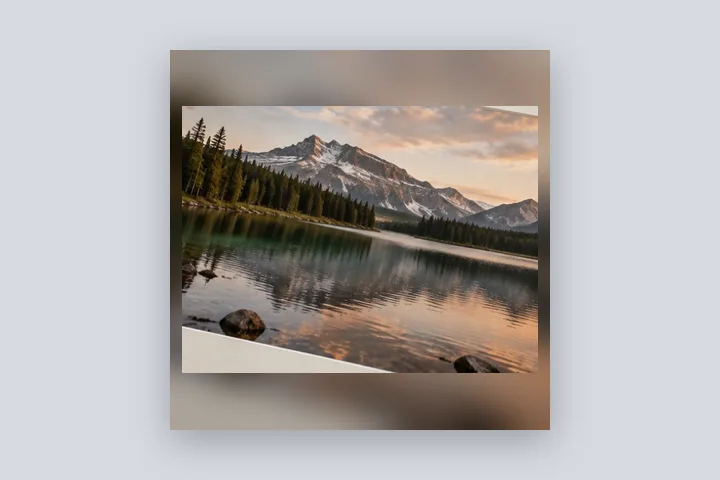
Proportion fixed at 1:1: the whole photo, padded with a blurred and slightly dimmed copy of itself, nothing cropped.
Opens as a 1:1 square with a 4 % margin and a blurred, 18 % dimmed copy of the photo behind it. Mirror fill is one tap under Fill.
Any photo, any shape. It is fitted whole; the blur fills the rest.
How to do it
- Open the photo. It is fitted into a square with a blurred copy behind it, in this tab.
- Pick the shape. Keep 1:1 or choose 4:5, 9:16 or another ratio under Border; Exact size gives a fixed pixel output.
- Tune the background. Under Fill set the blur radius and dimming, or switch to Mirror.
- Export. Save as JPG for sharing or PNG for an exact file.
The construction this opening uses
Padding a photo to a new shape leaves bars, and the bars have to be something. A blurred copy of the photo itself is the background that never clashes: it has the photo's own colours and no detail to compete with. The blur is drawn by scaling the photo down and back up, the same in preview and export, and its radius is a share of the canvas so a 640-pixel DP and a 6000-pixel print match.
A 4000 × 3000 landscape photo padded to 1:1 with a 4 % margin becomes 4320 × 4320: 160 px at each side and 660 px above and below. The blur radius is 4 % of 4320, about 173 px, and the dim is 18 % black.
| Photo | Finished square | Bars above and below |
|---|---|---|
| 4000 × 3000 | 4320 × 4320 | 660 px |
| 3024 × 4032 | 4354 × 4354 | 161 px (bars at the sides: 665 px) |
Where the treatment stops working
A blurred border cannot invent what lies outside the frame; it smears what is inside. A photo with a strong colour at one edge spreads that colour across that whole side, and a mirrored border shows obvious repetition when it is much wider than the photo. For a calm, printable result a solid or edge-colour fill is better.
- The blur is the photo itself, scaled and softened; no content is generated.
- A very wide mirror border repeats the photo visibly; soften it or narrow the margin.
The opening values are a starting construction, not a filter baked into the page. Every width, colour, unit and mode remains editable after the photograph opens, and the output readout states the dimensions before export. That makes the result reproducible instead of leaving its proportions hidden inside a decorative preset.
Questions
How strong should the blur be?
Strong enough that nothing in the border reads as a second copy of the photo. The radius is a share of the finished canvas's long edge: 3–5 % is a soft glow that keeps the colours, 8 % and above leaves only a wash. This opening uses 4 %.
What does dimming do?
It lays a black veil over the blurred copy so the sharp photo stands in front of it. Without it a bright photo can blend into its own border. This opening dims by 18 %; set it to 0 for a pure blur.
Blur or a solid colour — which is better?
Blur keeps the photo's own colours and looks finished on feeds where a white or black bar looks like a mistake. A solid colour is calmer and prints better. Edge colour, under Fill, is a middle way: a flat border in the average colour of the photo's outer edge.
What is the mirror fill?
Each edge of the photo reflected outward into the border, so lines and colours carry on across the seam. It can be softened with the same radius as the blur. Nothing is generated; every border pixel is a reflected photo pixel.
Does it crop the photo?
No. The photo is contained inside the margin and the border fills the rest. Fit ratio keeps every photo pixel; switch to Exact size under Border for an exact pixel output such as 1080 × 1350.
Same studio, other openings
- Square photo without cropping Bars added until a photograph is square, with nothing cut away.
- Instagram photo without cropping The whole photo in 1080 × 1350, 1080 × 1080 or a 1080 × 1920 story.
- WhatsApp DP without cropping The full photo in a 640 × 640 square, with the round crop shown.
- Add a white border to a photo Pure or paper white, even or weighted, with the saved file checked for banding.
- Instagram sizes without cropping Feed, grid and story sizes, and how padding survives each.


