What this page sets up for you
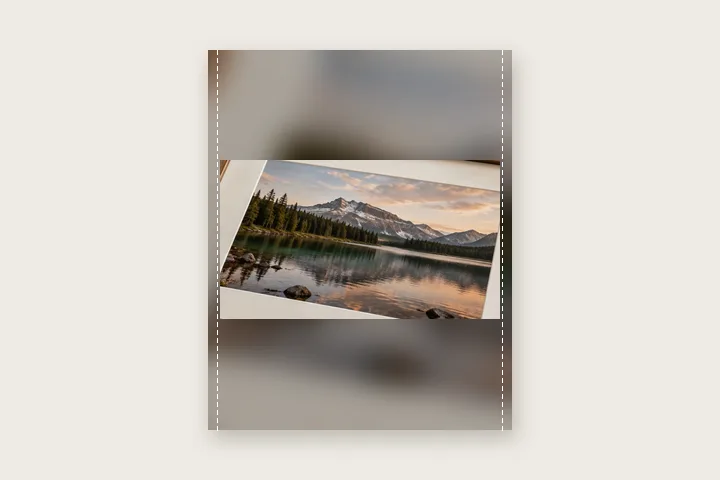
Pixels fixed at 1080 × 1350: the whole photo fitted inside a 4:5 post, bars filled with a blurred copy of itself.
Opens on an exact 1080 × 1350 post with a blurred fill. Square, landscape, 3:4 and 1080 × 1920 story are one tap under Border; the grid slice and story bands are drawn on the preview only.
Landscape, portrait or square — the whole photo is fitted in and nothing is cropped.
How to do it
- Open the photo. It is fitted into a 1080 × 1350 post at once, in this tab.
- Pick the post size. Under Border choose feed portrait, square, landscape, 3:4 or story.
- Choose the fill. Keep the blur, or switch to white, a colour or the photo's edge colour under Fill.
- Export. Save as JPG or PNG; the file is exactly the size shown on the button.
The construction this opening uses
Instagram crops a photo that does not fit its frame. Fitting it yourself means choosing the frame first — an exact pixel size — and then containing the whole photograph inside it: scaled down until it fits, centred, with the remaining area filled. Nothing is cut and nothing is stretched; the fill is the only new material.
A 4000 × 3000 landscape photo in a 1080 × 1350 post is drawn at 27 % — 1080 × 810 — with 270-pixel bars above and below. A 3024 × 4032 phone portrait is drawn at 1012 × 1350 with 34 pixels at each side. The receipt and the export button show these numbers before you save.
| Photo → post | Photo drawn at | Bars |
|---|---|---|
| 4000 × 3000 → 1080 × 1350 | 1080 × 810 | 270 px top and bottom |
| 3024 × 4032 → 1080 × 1350 | 1012 × 1350 | 34 px at each side |
| 4000 × 3000 → 1080 × 1080 | 1080 × 810 | 135 px top and bottom |
| 4000 × 3000 → 1080 × 1920 | 1080 × 810 | 555 px top and bottom |
Where the treatment stops working
Padding fills the frame without adding picture. A wide landscape in a tall story is a small strip in a large field of fill, however good the blur; if the subject needs the whole screen, the photo needs to be shot or cropped for it. This page never crops, so it cannot make that trade for you.
- Platform sizes come from a third-party guide checked on 18 Oct 2026 and change from time to time; confirm them in Instagram's own help pages.
- The upload is re-compressed by the platform after you post it; the file here is exact, what the app serves afterwards is not under this page's control.
The opening values are a starting construction, not a filter baked into the page. Every width, colour, unit and mode remains editable after the photograph opens, and the output readout states the dimensions before export. That makes the result reproducible instead of leaving its proportions hidden inside a decorative preset.
Questions
What size should an Instagram post be so nothing is cropped?
1080 × 1350 pixels (4:5) is the tallest feed post and takes the most screen space; 1080 × 1080 is square; 1080 × 566 is the widest landscape. This page produces those sizes exactly and fits the whole photo inside with padding, so Instagram has nothing to cut. The figures come from a third-party size guide checked on 18 Oct 2026 — confirm them in Instagram's own help pages before relying on them.
Why does my profile grid still cut the sides of a 4:5 post?
The profile grid previews posts as a 3:4 slice, which is narrower than 4:5. On a 1080 × 1350 post the grid shows roughly the middle 1013 pixels. The shaded side strips on the preview mark what the grid hides; the post itself still shows the whole picture.
What do the shaded bands on a story mean?
On a 1080 × 1920 story the app draws its own controls over the top and bottom. The guide shades the top 14 % and bottom 20 %; keep faces and text out of those bands. The bands are drawn on the preview only and are never written into the file.
Blur or white — which fill should I use?
Blur fills the bars with a softened, darkened copy of the photo itself, so the post looks full-bleed without cropping; it suits busy pictures. White or a solid colour reads as a deliberate frame and suits clean, graphic photos. Both are under Fill, along with the photo's own edge colour and a gradient.
Does fitting reduce the quality?
The photo is scaled down to fit the 1080-pixel width, as Instagram would do anyway — but here you choose how and see the result first. It is never enlarged unless you tick “Allow enlargement”, because enlarging adds no detail. The receipt states the scale used.
Same studio, other openings
- WhatsApp DP without cropping The full photo in a 640 × 640 square, with the round crop shown.
- Square photo without cropping Bars added until a photograph is square, with nothing cut away.
- Add a white border to a photo Pure or paper white, even or weighted, with the saved file checked for banding.
- Border Photo Add a border to any photo in px, %, mm or inches, measured and processed on your device.
- Fitting a photograph to a square Three ways to change a shape, and what each one costs.


