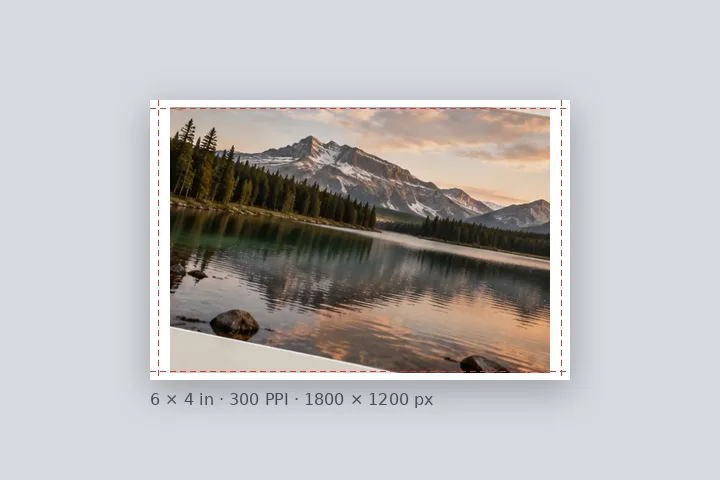

What this page sets up for you
Paper fixed: a 4 × 6 in sheet at 300 PPI, the photo contained inside a 5 mm margin, its effective PPI stated.
Opens on a 4 × 6 in sheet at 300 PPI with a 5 mm white margin, oriented to the photo. Sheets, PPI and bleed are under Border → Paper.
Any photo. It is fitted to the sheet without cropping.
How to do it
- Open the photo. It is fitted to a 4 × 6 sheet at 300 PPI, in this tab.
- Choose the sheet. Under Border, pick the sheet, the orientation and the PPI your lab asks for.
- Read the effective PPI. The readout says how sharp the print will be; under 200 it warns.
- Export with the receipt. Save the file and the receipt .txt, and tell the lab the sheet size.
The construction this opening uses
Paper fixed is the honest version of a print preset: instead of naming a margin after a sheet it never produced, it makes the sheet. The canvas is the sheet's size at the chosen PPI — 1200 × 1800 pixels for a 4 × 6 at 300 — and the photo is contained inside the margin, never cropped, oriented to match the photo unless you choose otherwise.
A 4000 × 3000 landscape photo on a landscape 4 × 6 at 300 PPI with 5 mm margins: the canvas is 1800 × 1200, the image area is 1682 × 1082, and the photo is drawn at 1443 × 1082 — 36.1 % of its pixels across — so it prints at an effective 832 PPI. A 1200 × 900 photo on the same sheet is enlarged to 1443 × 1082 and prints at an effective 250 PPI.
| Sheet | Millimetres | Pixels at 300 PPI |
|---|---|---|
| 4 × 6 in | 101.6 × 152.4 | 1200 × 1800 |
| 5 × 7 in | 127 × 177.8 | 1500 × 2100 |
| 8 × 10 in | 203.2 × 254 | 2400 × 3000 |
| A4 | 210 × 297 | 2480 × 3508 |
Where the treatment stops working
A file at the right pixel size does not guarantee the print: the lab may still crop to its own aspect, scale to fit, or apply its own colour. And PPI cannot add detail — a small photo enlarged to fill a large sheet carries only the detail it had, which the effective PPI figure states plainly.
- The PPI is not yet written into the file's header; tell the lab the size.
- Trim lines are drawn on the preview only, never into the file.
- Paper sizes are standard sheet dimensions; check your lab's own figures for borderless prints.
The opening values are a starting construction, not a filter baked into the page. Every width, colour, unit and mode remains editable after the photograph opens, and the output readout states the dimensions before export. That makes the result reproducible instead of leaving its proportions hidden inside a decorative preset.
Questions
What is effective PPI?
How many of your photo's own pixels land in each printed inch. A 4 × 6 at 300 PPI is 1200 × 1800 pixels; if your photo is 3000 pixels wide and fills that area, it is scaled down and prints at well over 300. If it is only 900 pixels wide it is scaled up and prints at about 225 effective PPI — the file still says 300, but the detail is that of 225. This page states the figure and warns under 200 and under 150.
4 × 6 or 5 × 7 — what changes?
The sheet: 101.6 × 152.4 mm against 127 × 177.8 mm, so 1200 × 1800 against 1500 × 2100 pixels at 300 PPI. A 4 × 6 is the 2:3 shape of most camera photos and fits them with even margins; a 5 × 7 is squarer, so a camera photo gets deeper margins at the top and bottom.
What does borderless with bleed do?
Labs that print to the edge trim a little off every side. With bleed on, the fill runs 3 mm past each trim edge, the file grows by 6 mm in each direction, and the trim line is drawn on the preview — never in the file — so you can keep anything important inside it.
Will the photo be cropped to fit the paper?
No. It is contained inside the margins, never cropped. If its shape differs from the paper's, the leftover space becomes border on two sides.
Is the PPI written into the file?
Not yet. The file is made at exactly the pixel size for the sheet at the PPI you chose; tell your print service the size in inches or mm. The receipt can be saved as a text file to send with it.
Same studio, other openings
- Print border in millimetres Millimetres first, with the resolution they are measured against on show.
- Photo mat border A gallery surround measured in millimetres against print resolution.
- Add a white border to a photo Pure or paper white, even or weighted, with the saved file checked for banding.
- Effective PPI before printing Why a PPI tag adds no detail, and how sharp a fitted photo will print.
- Border widths in millimetres Why the same 5 mm is 59 pixels in one file and 14 in another.


