What this page sets up for you
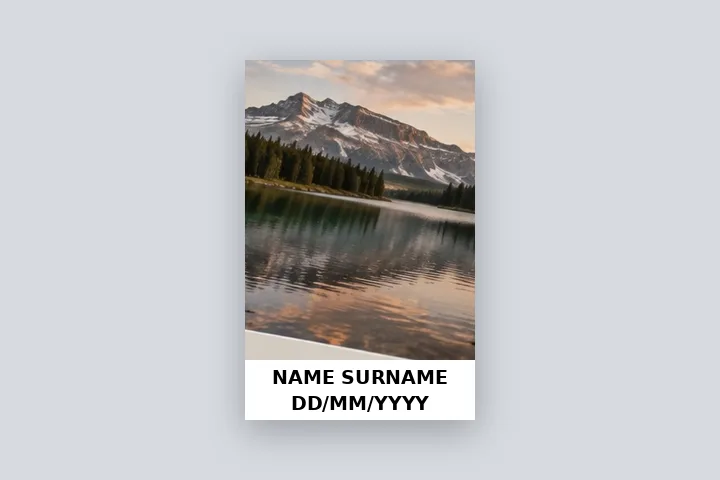
Pixels fixed at 413 × 531: the photo contained above an 18 % white strip carrying your name and date of photograph, saved as JPG inside 10–200 KB.
Opens at 413 × 531 px with an 18 % strip. Type the name and pick the date under Caption; the KB range is under the export button.
Your finished passport-style photo. Only the strip is added; the photo is not edited.
How to do it
- Open the photo. Use your finished passport-style photo; it is decoded in this tab and never uploaded.
- Type the name and date. Under Caption → Name and date strip, type the name and pick the date the photo was taken.
- Set the size and KB range. Use the size your notice states under Border, and its KB range under the export button.
- Save as JPG. Export; the page reports the final KB and quality. Check it against the official notice before uploading.
Sizes and limits the presets use
| Preset | Note |
|---|---|
| 413 × 531 px | 3.5 × 4.5 cm at 300 PPI, the common passport-photo proportion. |
| 350 × 350 px | A square size some online forms state; one source reports UPSC asking for it, another for up to 1000 × 1000. |
| 200 × 230 px | A small upright size some state forms state. |
| Preset | Range | Source |
|---|---|---|
| NEET UG style | 10–200 KB | PW (Physics Wallah) NEET photo guide, 2026 — a secondary source; the NTA bulletin governs, checked 2026-10-18 |
| UPSC style | 20–300 KB | BharatNotes UPSC photo FAQ (6 Oct 2026) — a secondary source; the UPSC notice governs, checked 2026-10-18 |
Check the current official notice — it overrides this preset. These are secondary sources, not the notices themselves.
The construction this opening uses
An exam photo with a name strip is two things in a fixed pixel size: the photo and a white band beneath it. This opening fixes the output at 413 × 531 pixels, reserves the lowest eighteen per cent — 96 pixels — for the strip, and contains the photo in the 413 × 435 pixels above it without stretching. Name and date are set black on white, centred, each line as large as the band allows.
A 1200 × 1600 passport-style photo is reduced to 326 × 435 and centred above the strip, with about 43 px of white at each side. A JPG at full quality of that size is usually 40–90 KB; the KB search lowers the quality only if the file is over your maximum, and reports the KB and quality it used.
| Output | Strip at 18 % | Photo area |
|---|---|---|
| 413 × 531 | 96 px | 413 × 435 |
| 350 × 350 | 63 px | 350 × 287 |
| 200 × 230 | 41 px | 200 × 189 |
Where the treatment stops working
This page adds a strip and controls size and weight; it does none of the other things an exam photo needs. It does not whiten the background, crop to the face, judge the face's share of the frame, or check the photo's age. A photo that fails those checks fails with or without a strip, and the official notice always overrides a preset here.
- No background change, no retouching, no face check.
- Presets come from secondary sources and are marked so; the notice governs.
- The name and date are never stored, and never put into recipes or share links.
The opening values are a starting construction, not a filter baked into the page. Every width, colour, unit and mode remains editable after the photograph opens, and the output readout states the dimensions before export. That makes the result reproducible instead of leaving its proportions hidden inside a decorative preset.
Questions
Which exams ask for the name and date on the photo?
Secondary guides for NEET UG 2026 and the UPSC civil services application describe a photo with the candidate's name and the date the photo was taken printed at the bottom. Requirements change from notice to notice, so read the official notice for your exam before you upload. Check the current official notice — it overrides this preset.
How do I get the file inside the KB limit?
Set the minimum and maximum under the export button (this page opens at 10–200 KB). The page tries JPG qualities and saves the highest that fits under the maximum, keeping the pixel size. If even quality 50 % is too large it asks before reducing the pixel size; if even full quality is under the minimum it says so rather than padding the file. 1 KB here is 1024 bytes.
Will my photo be accepted?
This page cannot promise that. It adds the strip and makes the file the size and weight you set. It does not change the background, retouch the face, check how much of the frame the face fills or verify anything against an exam's rules — the official notice and the portal decide.
What size in pixels should I choose?
Whatever your notice states. The presets — 413 × 531 (3.5 × 4.5 cm at 300 PPI), 350 × 350 and 200 × 230 — are common figures, not rules; type any width and height under Border. The photo is fitted above the strip without stretching; any leftover space is white.
Can I write my name in Hindi?
Yes. Devanagari names are set in the bundled Noto Sans Devanagari face. Check whether your form wants the name in English capitals; Capital letters is on by default.
Does the page fill in today's date?
No. The date line starts empty, because the date of photograph is the day it was taken, which only you know. Pick it with the date field or type it.
Same studio, other openings
- Put a caption on a photo One or two lines in a deepened border, Hindi included, never over the picture.
- WhatsApp DP without cropping The full photo in a 640 × 640 square, with the round crop shown.
- Fit a photo to a print size 4 × 6, 5 × 7, A4 and more at a stated PPI, with the effective PPI shown.
- Name and date on exam photos What exam instructions describe, how the strip is measured, and its limits.
- Border Photo Add a border to any photo in px, %, mm or inches, measured and processed on your device.


