What this page sets up for you
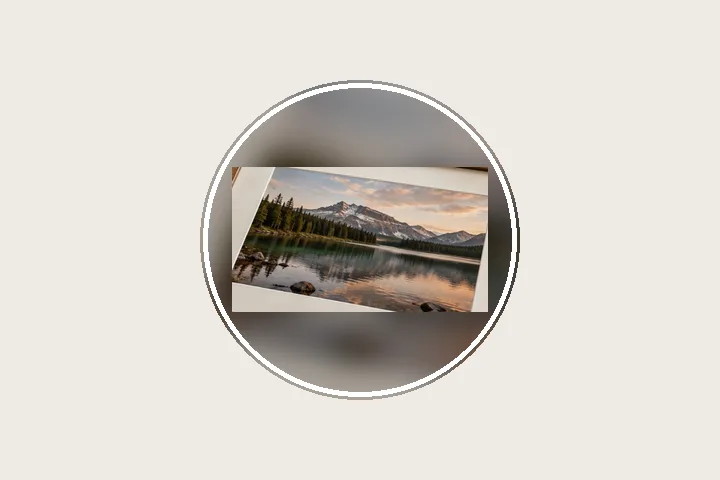
Pixels fixed at 640 × 640: the full photo fitted inside the square with a blurred background and the round crop shown.
Opens on an exact 640 × 640 square with a 6 % margin and a blurred background. The dashed circle shows what WhatsApp will display; a ring is under Border.
Any photo, any shape. The whole picture is fitted inside the square.
How to do it
- Open the photo. It is fitted into a 640 × 640 square in this tab; nothing is uploaded.
- Check the circle. Keep faces inside the dashed circle; widen the margin under Border if needed.
- Choose the background. Keep the blur, or pick white, a colour or the photo's edge colour under Fill. Add a ring if you like.
- Save and set it. Export the 640 × 640 file and choose it as your profile photo.
The construction this opening uses
A profile picture is stored square and shown round, so two things decide whether a photo survives: whether it fits the square without being cut, and whether what matters sits inside the circle. This opening fixes the output at 640 × 640, keeps a six per cent margin on every side, and contains the whole photo in what remains, filling the rest with a blurred, slightly darkened copy of itself.
The margin is 6 % of 640, or 38 pixels, leaving a 564-pixel box. A 4000 × 3000 landscape photo is drawn at 564 × 423 with 109 pixels above it; a 3024 × 4032 portrait at 423 × 564. The receipt states the scale and the export button the exact size.
| Photo | Drawn at | Scale |
|---|---|---|
| 4000 × 3000 | 564 × 423 | 14.1 % |
| 3024 × 4032 | 423 × 564 | 14.0 % |
| 1080 × 1080 | 564 × 564 | 52.2 % |
Where the treatment stops working
Not cropping means a wide or group photo becomes small inside the circle. If a face must fill the DP, the photo has to be cropped, and this page does not crop. It also cannot check that a face is inside the circle for you; the guide shows the circle and the judgement is yours.
- Size figures come from a third-party guide checked on 18 Oct 2026; confirm in WhatsApp's own help pages.
- WhatsApp re-compresses the photo after upload; the file here is exact, the copy the app serves is not under this page's control.
The opening values are a starting construction, not a filter baked into the page. Every width, colour, unit and mode remains editable after the photograph opens, and the output readout states the dimensions before export. That makes the result reproducible instead of leaving its proportions hidden inside a decorative preset.
Questions
What is the WhatsApp DP size?
A square: 640 × 640 pixels is the commonly recommended size, and pictures much smaller than 192 × 192 are too small. The app stores the square and shows it in a circle. These figures come from a third-party guide checked on 18 Oct 2026 — confirm them in WhatsApp's own help pages.
How do I put my full photo as a WhatsApp DP without it being cut?
Open the photo here: it is fitted inside a 640 × 640 square with a margin, and the space around it is filled with a blurred copy of the same photo. Save the file and choose it as your profile photo; because it is already square, the app has nothing to crop.
Why is part of the square darkened in the preview?
WhatsApp shows the DP as a circle, so the corners of the square are hidden. The dashed circle and darkened corners show exactly what will be visible. Keep faces inside the circle; widen the margin under Border if they are not. The guide is not written into the file.
Can I add a coloured ring around the DP?
Yes. Under Border, turn on “Ring inside the circle” and pick a width and colour. The ring is drawn into the file touching the edge of the square, so it sits just inside the round crop.
Will a landscape photo work as a DP?
Yes — it is reduced until its full width fits inside the circle-safe margin, with blurred fill above and below. A group photo will be small in a DP; that is the cost of not cropping, and the preview shows it before you save.
Same studio, other openings
- Instagram photo without cropping The whole photo in 1080 × 1350, 1080 × 1080 or a 1080 × 1920 story.
- Square photo without cropping Bars added until a photograph is square, with nothing cut away.
- Add a white border to a photo Pure or paper white, even or weighted, with the saved file checked for banding.
- Border Photo Add a border to any photo in px, %, mm or inches, measured and processed on your device.
- Fitting a photograph to a square Three ways to change a shape, and what each one costs.


