What this page sets up for you
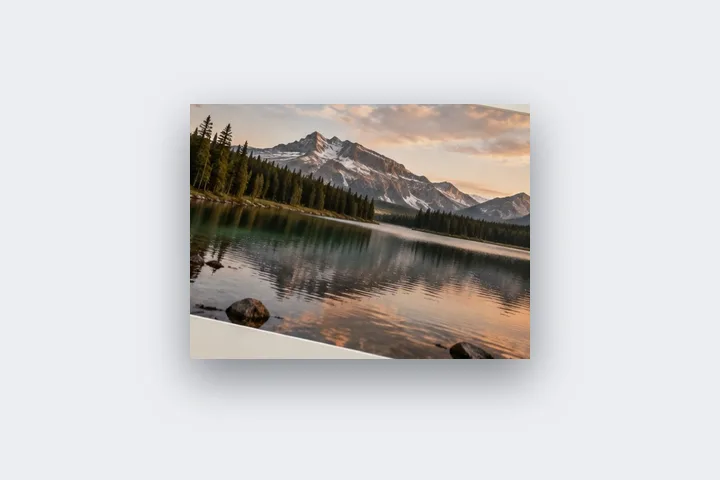
Photo pixels fixed: a soft drop shadow cast onto a light border, every length a number in % of the long edge.
Opens on an 8 % light-grey border with a soft shadow 1.2 % below the photo. Every shadow figure is under Shadow.
Any photo. The shadow falls on the border around it.
How to do it
- Open the photo. It opens in this tab with a light border and a soft shadow; nothing is uploaded.
- Shape the shadow. Under Shadow, change the offset, blur, spread and opacity, or take the colour from the photo.
- Give it room. Widen the border on the side the shadow falls toward so it is not clipped.
- Export. Save as PNG for an exact result, or PNG with Fill set to None for a transparent background.
The construction this opening uses
A drop shadow makes a flat photo read as an object lying on a surface. Two things sell it: a border lighter than the shadow so it has somewhere to fall, and a blur large enough that the edge is soft. This opening uses a light grey border at 8 % of the long edge and a shadow offset 1.2 % downward with a 3 % blur at 32 % opacity.
On a 4000 × 3000 photo the border is 320 px a side, the shadow drops 48 px and blurs over 120 px, so it fades well inside the border. On a 1080-pixel phone picture the same figures are 86, 13 and 32 px. The shadow never changes the output size: it is drawn inside the canvas the border defines.
| Photo | Border | Shadow drop / blur |
|---|---|---|
| 4000 × 3000 | 320 px | 48 px / 120 px |
| 1080 × 1350 | 108 px | 16 px / 41 px |
Where the treatment stops working
A shadow drawn this way is a flat, even falloff from a rectangle. It does not curl with a bent print, take the shape of a cut-out subject or respond to a light direction beyond the offset you set. On a dark border a black shadow disappears; use a lighter border or a coloured shadow.
- The shadow is clipped at the canvas edge; it never grows the file.
- JPG writes transparent areas as white, so a transparent-background shadow needs PNG or WebP.
The opening values are a starting construction, not a filter baked into the page. Every width, colour, unit and mode remains editable after the photograph opens, and the output readout states the dimensions before export. That makes the result reproducible instead of leaving its proportions hidden inside a decorative preset.
Questions
What is the difference between a soft shadow and a contact shadow?
A soft or floating shadow sits well below the photo with a wide blur, as if the print hovers a few centimetres off the board; this opening uses that. A contact shadow is small and tight — a short offset, a small blur — as if the print lies flat. Under Shadow, set Offset Y to about a third of the blur and lower the blur for contact.
Can I save a shadow with a transparent background?
Yes. Under Fill choose None, and under Fill set the transparency policy as you like, then export as PNG or WebP. The shadow is kept as soft, partly transparent pixels, so the picture can be placed on any background. JPG cannot hold transparency and writes the background as white.
Why is the edge of my shadow cut off?
A shadow is cast inside the finished canvas and never changes its size. If the blur or offset reaches past the border, the shadow is clipped at the canvas edge. Widen the border — especially the side the shadow falls toward — or reduce the blur. The output size shown on the export button does not change when you edit the shadow.
Are the shadow lengths in pixels?
They follow the width unit. This opening uses percent of the photo's long edge, so the same shadow looks the same on a phone picture and a 24-megapixel print file. Switch to px or mm and every length converts.
Is the shadow added to the photo or behind it?
Behind it. It is cast by the photograph's rectangle (or rounded rectangle) onto the border, and the photo is drawn on top, untouched.
Same studio, other openings
- Round the corners of a photo Photo and canvas radii set separately, transparent outside in PNG.
- Photo frame editor Mat, keylines, a frame band and a shadow, every one an editable number.
- Add a white border to a photo Pure or paper white, even or weighted, with the saved file checked for banding.
- Photo outline maker A measured outline round the photo's edge, or round the person with an optional local model.
- Border Photo Add a border to any photo in px, %, mm or inches, measured and processed on your device.


