
What this page sets up for you
Deckle, scallop, zigzag, stamp, dashed and dotted edges, each one a set of numbers — depth, repeat and seed — not a picture pasted round your photo.
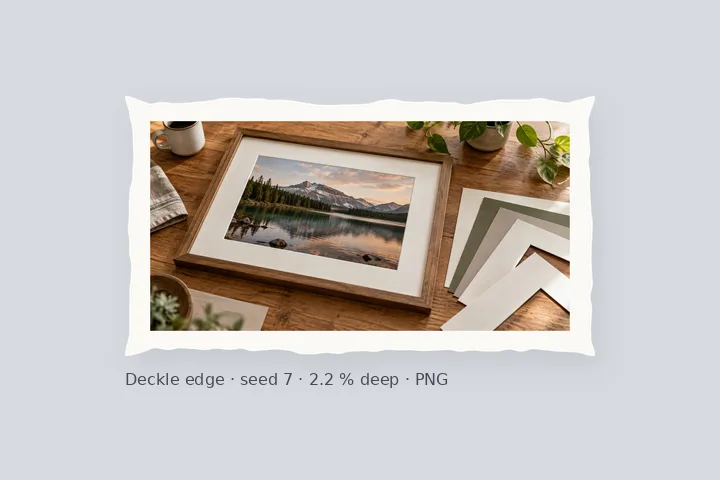
Opens with a 6 % paper-white border and a deckle edge 2.2 % deep that repeats every 9 %, seed 7. Switch the pattern under Edges.
JPG, PNG, WebP, HEIC and more. Save as PNG to keep the cut-away edge see-through.
How to do it
- Choose a photo. It opens with a paper-white border and a deckle edge already applied.
- Pick a pattern. Under Edges, choose deckle, scallop, zigzag, stamp, dashed or dotted.
- Set the numbers. Change the depth and how often it repeats; for a deckle, try another seed.
- Export. Save as PNG to keep the cut-away edge see-through, or JPG for a white edge.
The construction this opening uses
A decorative edge here is geometry with units. The canvas outline is computed from a depth and a repeat length, and the repeat is snapped on each side so a whole number of scallops, teeth or holes fits between the corners. Deckle, scallop, zigzag and stamp cut the canvas itself, so the cut-away is transparent; dashed and dotted draw a line inside the border, never over the photograph. The preview is the export at a smaller scale, so the pattern you see is the pattern you save.
A 4000 × 3000 photo with the opening recipe: the 6 % border is 240 px, so the canvas is 4480 × 3480. The deckle is 88 px deep and asked to repeat every 360 px; snapped, that is 12 repeats of 373.3 px across and 10 of 348 px down. Switch to scallop at 144 px and the sides take 31 and 24 bumps.
| Pattern | Asked for | Snapped across | Snapped down |
|---|---|---|---|
| Deckle, 88 px deep | every 360 px | 12 × 373.3 px | 10 × 348 px |
| Scallop, 56 px deep | every 144 px | 31 × 144.5 px | 24 × 145 px |
| Stamp, 64 px holes | every 104 px | 43 × 104.2 px | 33 × 105.5 px |
Where the treatment stops working
A pattern is only as fine as the pixels under it: a 2 px scallop on a small file is a wobble, not a scallop. Cut edges need PNG or WebP to stay see-through; in JPG they turn white, which looks right on a white page and wrong on a dark one. And these are geometric patterns — there are no clip-art frames, flowers or themed borders here.
- Six patterns, one at a time; they are not combined.
- JPG writes the cut-away as white.
- No clip-art or themed frame images.
The opening values are a starting construction, not a filter baked into the page. Every width, colour, unit and mode remains editable after the photograph opens, and the output readout states the dimensions before export. That makes the result reproducible instead of leaving its proportions hidden inside a decorative preset.
Questions
What does “measured pattern” mean here?
Every edge is worked out from numbers you can see and change: how deep it cuts, how often it repeats and, for the deckle, a seed. Nothing is a stock frame image stretched over your photo, so the same settings give the same edge on a 640 px picture and a 6000 px print, just larger.
What is the seed on the deckle edge?
The deckle is irregular, like hand-torn paper, but not random each time: the seed picks which irregular edge you get. Keep the seed and the edge comes out identical every time, at any size; press New edge for a different one. The seed is saved with the recipe and in a shared link.
Why do the corners always line up?
The repeat is snapped separately on each side so a whole number of scallops, teeth, holes or dashes fits exactly. Ask for one every 144 px on a 4480 px side and you get 31, each 144.5 px. The studio shows the snapped figure, so nothing ends on half a bump at a corner.
What happens outside a deckle, scallop or stamp edge?
It is cut away. In PNG and WebP those areas are see-through, so the edge shows on whatever background the picture is placed on. JPG has no transparency, so they are written as white, and the studio says so before you export.
Will the pattern cut into my photo?
Not if the border is wider than the pattern is deep. The studio compares the two and warns when the pattern would reach the photograph, with the figures, so you can widen the border or make the pattern shallower.
Can I print it at a set size?
Yes. Set the border and the pattern in millimetres against a print resolution, or open Border → Paper and pick a sheet; JPG and PNG exports carry that resolution in their header.
Same studio, other openings
- Border Photo Add a border to any photo in px, %, mm or inches, measured and processed on your device.
- Photo frame editor Mat, keylines, a frame band and a shadow, every one an editable number.
- Polaroid frame A clean white frame with a measured writing margin below.
- Round the corners of a photo Photo and canvas radii set separately, transparent outside in PNG.
- Fit a photo to a print size 4 × 6, 5 × 7, A4 and more at a stated PPI, with the effective PPI shown.
- Put a caption on a photo One or two lines in a deepened border, Hindi included, never over the picture.


