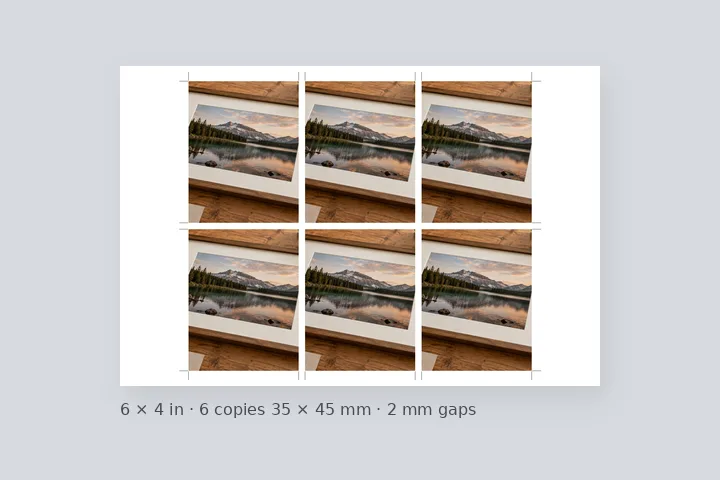
What this page sets up for you
One finished passport photo tiled onto a 4 × 6 in or A4 sheet at 300 PPI, with equal cut gaps and optional cut marks — as many copies as fit.
How to do it
- Choose your finished photo. One photo, already cropped and with the background your application asks for.
- Pick the sheet and the size. 4 × 6 in or A4, and 35 × 45 mm, 2 × 2 in, stamp size or your own size in mm.
- Set the gap and marks. 2 mm gaps and cut marks to start; change the margin or the number of copies if you like.
- Download and print at 100 %. Save the JPG or PNG and ask for it to be printed at actual size, without fit to page.
The construction this opening uses
A print sheet is arithmetic in millimetres. The sheet and the photo size are converted to pixels once at the chosen PPI; the page then finds how many copies fit between the margins with the stated gap, tries the sheet both ways round, and centres the grid. Every copy is the same whole number of pixels and every gap is identical, so a trimmer set once cuts them all. The photo itself is contained inside each copy — never cropped — because this page cannot know where the face is and does not pretend to.
35 × 45 mm at 300 PPI is 413 × 531 px, and a 2 mm gap is 24 px. A portrait 4 × 6 is 1200 × 1800 px; with a 4 mm (47 px) margin, two copies fit across (2 × 413 + 24 = 850 px) and three down (3 × 531 + 2 × 24 = 1641 px). The 850 × 1641 px grid is centred, leaving 175 px at the sides and 80 px at the top and bottom, and the cut marks sit in that margin.
| Photo size | Pixels each | 4 × 6 in | A4 |
|---|---|---|---|
| 35 × 45 mm | 413 × 531 | 6 (2 × 3) | 30 (5 × 6) |
| 2 × 2 in (50.8 mm) | 600 × 600 | 2 (6 with no gap or margin) | 15 (3 × 5) |
| 20 × 25 mm | 236 × 295 | 20 (4 × 5) | 91 (13 × 7, landscape) |
Where the treatment stops working
A sheet cannot be better than the photo on it: a small or blurry photo prints small or blurry six times, and the page warns when the photo has too few pixels for the size. Labs that scale to fit their own paper will shrink every copy, so ask for actual size. And the page is not a passport photo maker: it does not crop, retouch, change the background or check the rules.
- One photo per sheet; every copy is the same.
- No cropping, face detection, background change or compliance check.
- Size presets are common sizes, marked verify — the official rules decide.
The opening values are a starting construction, not a filter baked into the page. Every width, colour, unit and mode remains editable after the photograph opens, and the output readout states the dimensions before export. That makes the result reproducible instead of leaving its proportions hidden inside a decorative preset.
Questions
How many passport photos fit on a 4 × 6 sheet?
Six at 35 × 45 mm with a 2 mm gap and a 4 mm margin: two across and three down on a portrait 4 × 6. A 4 × 6 is exactly two by three 2-inch squares, so 2 × 2 in photos fit six only with no gap and no margin — two with them. Twenty 20 × 25 mm stamp-size copies fit. On A4 with a 5 mm margin, thirty 35 × 45 mm copies fit. The page works out the most that fit, trying both orientations, and shows the count before you save.
What gap should I leave between the photos?
2 mm is the default: enough to cut down the middle with scissors or a trimmer without nicking either photo. Set 0 for a lab that cuts on exact lines, or more for hand cutting. The gap is converted to whole pixels once, so every gap on the sheet is identical.
Does it check that my photo meets passport rules?
No. It tiles the photo you give it. It does not crop, find the face, change or check the background, or judge the size of the head. Make the photo to the official rules first; the rules for your application always decide, and every size preset here is marked “verify”.
What if my photo is not exactly 35 × 45 in shape?
It is fitted inside each copy without cropping, and the page tells you how much white that leaves. Nothing is cut off, because this page does not know where the face is. Crop the photo to the right shape first if your form needs it edge to edge.
Will it print at the right size?
The sheet is made at exactly the pixel size of 4 × 6 in or A4 at the PPI you pick, and that PPI is written into the JPG or PNG header so print software opens it at the right size. Ask the lab to print at 100 % (no “fit to page”) and check one copy with a ruler.
Same studio, other openings
- Fit a photo to a print size 4 × 6, 5 × 7, A4 and more at a stated PPI, with the effective PPI shown.
- Name and date on photo An exam strip with name and date of photograph, exact pixels, inside a KB range.
- Print border in millimetres Millimetres first, with the resolution they are measured against on show.
- Border inside a photo The file keeps its pixel size; the photo is scaled down to make room.
- Add a border to many photos One rule across a folder, a preview per photo and one ZIP.


